Navigating the Goods and Services Tax GST Login portal is an essential task for business owners and tax professionals in India. With the shift towards digital taxation, understanding how to access and utilize the GST portal is crucial.
The process may seem complicated at first, but with the right guidance, you can smoothly log in to your GST account and manage your tax responsibilities effectively. This step-by-step guide will walk you through everything you need to know to access your GST account with ease.
Understanding GST and Its Importance
Before diving into the login process, it’s important to understand what GST is and why logging into the portal matters. GST is a single tax system that replaced multiple indirect taxes in India. It simplifies tax filing and payment processes, benefiting both businesses and the government. The GST portal provides a platform for businesses to manage various aspects of their GST accounts, including return filings, tax payments, and compliance checks.
Whether you’re a business owner, accountant, or tax consultant, having easy access to the GST portal is vital for staying on top of your tax obligations. The login process is the first step toward ensuring your business is in compliance with the GST laws.
For More Information : MPTAAS Scholarship Status Check
Creating Your GST Account for Login
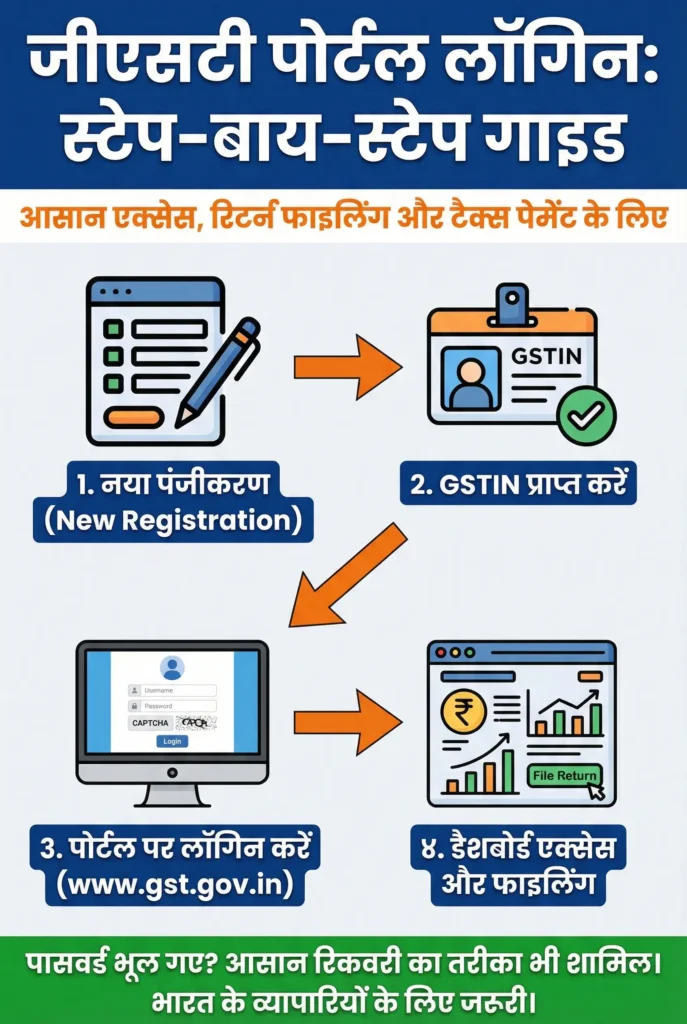
Before you can log in, you need to have a registered GST account. If you haven’t registered yet, here’s how you can do it:
- Go to the GST Portal
Start by visiting the official GST website at www.gst.gov.in. - Click on ‘Services’ and Choose ‘New Registration’
On the homepage, you will see a menu option labeled “Services.” Hover over it and click on “New Registration” to begin your registration process. - Fill Out the Registration Form
You’ll be asked to enter some basic details about your business, including your name, PAN (Permanent Account Number), email address, mobile number, and business type. After filling out the details, you’ll receive a Temporary Reference Number (TRN). - Complete the Verification Process
To verify your identity, you’ll receive an OTP (One-Time Password) on your registered email or mobile number. Enter this OTP to verify your details. - Receive GSTIN
Upon successful verification, you will receive your GSTIN (Goods and Services Tax Identification Number), which is your unique registration number. This GSTIN will be your key identifier when logging into the GST portal.
Logging into the GST Portal
Once you have your GSTIN, you’re ready to log in. Follow these steps:
- Visit the GST Portal
Go to the official GST portal at www.gst.gov.in. - Click on the ‘Login’ Button
On the homepage, locate the “Login” button, which is typically found at the top right corner of the page. Click on it to be directed to the login screen. - Enter Your GSTIN or User ID
You will be asked to enter your GSTIN or User ID. The GSTIN is a 15-character number that identifies your business, while the User ID is the login credential you created during registration. - Enter Your Password
After entering your GSTIN/User ID, you’ll need to input your password. This password was created during your registration process. If you’ve forgotten your password, you can easily reset it by clicking the “Forgot Password” option. - Solve the CAPTCHA
To confirm that you’re not a bot, you will need to complete a CAPTCHA verification. This is a security feature to protect your account from unauthorized access. - Click ‘Login’
Once you’ve entered all your details correctly, click on the “Login” button. You will be directed to your GST dashboard where you can access all the services available to you.
What to Do if You Forget Your GST Password
It’s common to forget passwords, but fortunately, the GST portal offers an easy recovery process. Here’s how you can reset your password:
- Go to the Login Page
On the GST portal login screen, click on the “Forgot Password” link. - Enter Your GSTIN and CAPTCHA
You will be prompted to enter your GSTIN along with a CAPTCHA code for verification. - Receive OTP for Verification
An OTP will be sent to your registered mobile number or email address. Enter the OTP in the required field. - Set a New Password
After successful OTP verification, you’ll be allowed to set a new password. Ensure that it’s strong and something you can remember. - Log In with New Credentials
Once your password is reset, you can log in with your new password and continue accessing your GST account.
You Can Also Read : MPTAAS Portal – Complete Guide
Common GST Login Issues and How to Resolve Them
Occasionally, you may encounter some issues while logging in to the GST portal. Here are some common problems and solutions:
- Incorrect GSTIN/Password: Double-check your GSTIN and password to ensure that they are entered correctly. Make sure your GSTIN includes all 15 characters, and that Caps Lock isn’t turned on.
- Captcha Verification Issues: If the CAPTCHA isn’t working, refresh the page or try a different browser. You might also want to clear your browser cache.
- Server Downtime: Sometimes, the portal may be down for maintenance. If you can’t log in, check the portal’s status or try again after some time.
Benefits of Logging into Your GST Account Regularly
Logging into your GST account regularly comes with several advantages:
- Filing GST Returns: You can file your GST returns directly through the portal, ensuring timely compliance.
- Tax Payment: Easily make tax payments, view your outstanding liabilities, and check the status of your payments.
- Accessing Tax Records: View and download important tax documents, such as invoices and GST returns.
- Updating Business Details: Update your business information when needed, such as address changes or authorized signatories.
Conclusion
The GST login process may seem daunting at first, but once you understand the steps and the features available, it becomes an easy task. Whether you’re managing tax filings, making payments, or just keeping track of your GST details, logging into the portal is the first step towards managing your business’s tax responsibilities efficiently.
By following this guide, you should be able to access your account without hassle and make the most of the services offered by the GST portal. Keep your login credentials secure and stay proactive about updating your account whenever necessary to ensure a smooth tax process for your business.